


Please explain how to download Ultra Libralian (ECAD model) and how to interpret the icons.
ID: FAQE10110E
update:
Answer
Our official website, in collaboration with Ultra Librarian, allows you to download ECAD data such as circuit diagram symbols, PCB footprints, and 3D CAD models for target products free of charge.
Before using this app, please log in or register as a member via the “Ultra Librarian 3D/ECAD” displayed in the MODEL LIST on the product details page or in the model list of the parametric search.
Explanation
Q. What is Ultra Librarian?
A. Ultra Librarian is an external service that provides ECAD data necessary for circuit design, such as circuit diagram symbols, PCB footprints, and 3D CAD models. The official website of OMRON Device & Module Solutions Company, in collaboration with Ultra Librarian, allows you to download ECAD models for target products free of charge and use them for design work in various ECAD tools. This makes it possible to reduce the time and effort required to create component libraries and improve the efficiency of design work.
Q. Where can I access Ultra Librarian’s ECAD models?
A. You can access Ultra Librarian's ECAD models on the following two pages:
① Product details page
On the details page for each product, you can download the data by logging in or registering as a member via the “Ultra Librarian 3D/ECAD” link displayed in the MODEL LIST.
・Example of a product details page: https://components.omron.com/kr-en/products/connectors/XF3M-XF2M
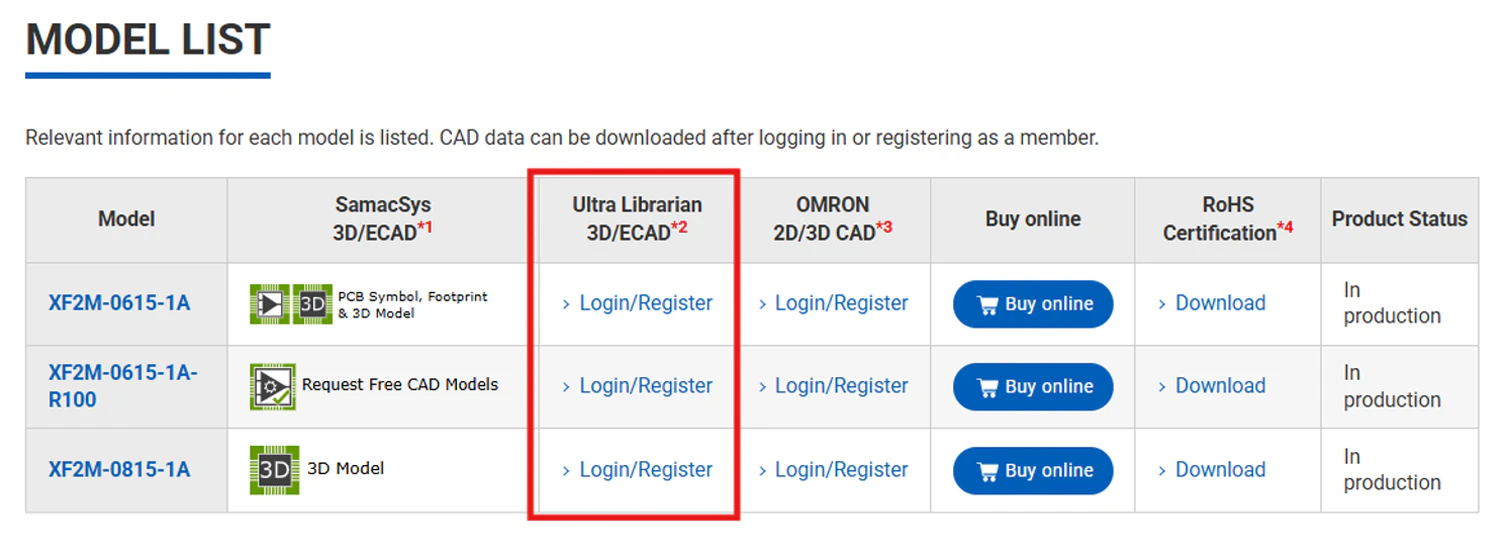
② Parametric search (model list page)
In the MODEL LIST displayed after performing a conditional search, you can download the data via the “Ultra Librarian3D/ECAD” link shown in the row of each model.
・Example of parametric search: https://components.omron.com/kr-en/products/parametric-search/mosfet-relays

Q. Are there any precautions to take when using Ultra Libralian ECAD models or 3D CAD data?
A. Yes. Please note the point below.
Disclaimer
The 3D CAD and ECAD data were independently created by Ultra Libralian based on information provided by our company; therefore, we do not guarantee the accuracy, up-to-dateness, or completeness of the 3D CAD and ECAD data.
When using this data for design or manufacturing purposes, be sure to verify its contents in conjunction with the latest datasheets and specifications.
| Product category | Relays Power Relays |
|---|---|
| Classification | Standards, Exprt-related, Others |
| Related keywords |
|
Related Questions
-
Q
Please explain how to download SamacSys (ECAD model) and how to interpret the icons.
- A
Our official website, in collaboration with SamacSys, allows you to download ECAD data such as circuit diagram symbols, PCB footprints, and 3D CAD models for target products free of charge.
Please use the green icon for “SamacSys 3D/ECAD” displayed on the product details page or in the model list of the parametric search.
When you download the service for the first time, or if you have not used it for an extended period, the SamacSys screen will appear after the consent screen regarding the handling of personal information is displayed.
